Guides / 7 min read
7 signs your network closet needs a cleanup
Unlabeled cables, heat, blinking mystery boxes and a rack nobody wants to touch are all signs. Here is what a closet cleanup fixes and how it is done without long downtime.
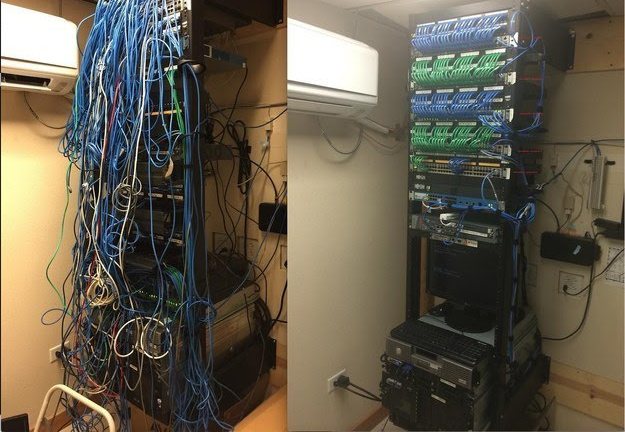
How do I know my network closet needs a cleanup?
Your network closet needs a cleanup when nobody can trace a cable to its port quickly, when the space runs hot, or when people are afraid to touch the rack in case something goes down. Those are signs that small problems are now slowing down every fix and every change.
A messy closet is rarely one person's fault. It builds up over years of new hires, moves, vendor visits and quick fixes. The good news is that a planned cleanup, usually called a rack re-organization, turns it back into something your team or your IT provider can work with.
What are the most common warning signs?
If more than two of these sound familiar, it is time to plan a cleanup.
1. Nothing is labeled
Cables, patch panel ports and switch ports have no labels, or the labels are wrong. Every change starts with unplugging cables to see what goes dark.
2. Patch cables in a tangle
Cables are far too long, hang in loops across the front of the rack and block access to the equipment.
3. The room is hot
Equipment feels hot, fans are loud, or someone left the door open to cool it down. Florida heat makes this worse fast.
4. Mystery devices
There are boxes, adapters or old switches that nobody can identify, and nobody knows whether they are still needed.
5. No backup power
The modem, firewall and switches plug straight into the wall or a basic power strip, so a brief flicker drops the whole office.
6. Abandoned cable
Old cable from past tenants or systems is still in the ceiling and the rack, adding clutter and fire load.
7. No documentation
There is no network diagram, no list of IP addresses and no record of admin passwords.
Why does a messy closet cause real problems?
A messy closet causes longer outages, because every troubleshooting step takes more time when you cannot see or trace anything. A problem that should take minutes to find can take much longer when the first step is untangling cables.
It also creates risk. Blocked airflow shortens equipment life, especially in a warm Florida closet. Unlabeled ports make it easy to unplug the wrong device, and undocumented equipment can hide security issues like default passwords or unsupported firmware.
What happens during a rack re-organization?
A cleanup is planned work, not an afternoon of pulling cables. Here is how we approach it.
Document what is there
We photograph the rack, trace and record every connection, and identify each device before touching anything.
Plan the new layout
We design where patch panels, switches, cable managers, firewall and UPS will sit, and map each port to its new position.
Schedule the work
The change is scheduled after hours or during a quiet window so the office is not disrupted.
Rebuild the rack
We install cable management, replace patch cords with correct lengths, remove abandoned cable and dead equipment, and re-patch to the plan.
Label and test
Ports, panels and cables are labeled to TIA-606, and every connection is tested before the office returns.
Hand over documentation
You receive a network diagram, a port map, credentials and before and after photos.
What should a network closet cleanup checklist include?
Use this checklist to judge your closet or to review a cleanup proposal.
- Every device identified, with unused equipment removed
- Patch panels, switch ports and cables labeled to TIA-606
- Short, color-coded patch cords sized to the distance
- Horizontal and vertical cable managers, using Panduit or equivalent components
- Proper bend radius and no cables pulled tight across equipment
- Clear airflow front to back, with ventilation or cooling for the room
- UPS for the modem, firewall, switches and NVR, with surge protection
- Rack and equipment properly grounded
- Abandoned cable removed from the rack and pathways where accessible
- Network diagram, IP list and admin credentials documented and handed over
- Firmware updated and default passwords changed
How long does a closet cleanup take, and is there downtime?
Most of the work happens before any cable is moved, and the actual re-patching is usually scheduled after hours to keep downtime short. The planning and documentation step is what makes the switch-over fast, because every port already has a destination.
Larger server rooms with several racks, like multi-rack Panduit and Cisco Catalyst setups, may be done in phases over more than one visit. We agree on the schedule with you before starting.
What drives the cost of a cleanup?
Cost depends on the number of racks and ports, how much tracing is needed, how much abandoned cable must come out, whether new cable managers, patch panels or a UPS are needed, and whether the work happens after hours.
After an on-site assessment, you get a fixed written quote. Many businesses also add a monthly monitoring and maintenance plan so the closet stays organized after the cleanup.
A cleanup is also a good time to replace equipment that is failing, unsupported or undersized, because the rack is already being rebuilt and documented. Common upgrades include a PoE switch with enough power for cameras and access points, a proper UPS, and new patch panels to replace worn or mismatched ones.
Upgrades are optional, not required. We point out what is working fine, what is near the end of its life and what could wait, so you can decide what fits your plans.
How do you keep the closet clean after the cleanup?
You keep a closet clean by making the right way the easy way: spare patch cords in the correct lengths, a labeling tool nearby and a simple rule that every change gets labeled and recorded. Most closets get messy again because the quick fix is easier than the proper one.
Limit who can make changes, and ask vendors to follow the same labeling scheme and update the port map. A short review a few times a year catches drift early, like a new device plugged in without a label or a UPS battery nearing the end of its life.
For businesses that would rather not think about it, a monthly monitoring and maintenance plan can include regular checks of the rack, UPS health, firmware and documentation.
Ready to fix your network closet?
LocalTechify cleans up network closets and server rooms for businesses in Orlando and across Central Florida, backed by more than 25 years of hands-on rack and cabling work. Book a free site assessment and we will review your closet, explain what needs attention and give you a fixed written quote.
More guides
How many security cameras does a business need?
The right number of cameras comes from what each one must show, not from a package deal. Here is how to plan coverage with pixels per foot, field of view and storage.
Read the guideCat6 vs Cat6A for offices: which cable should you install?
Cat6 still handles most office desk drops. Cat6A earns its place for WiFi 6E and WiFi 7 access points, heavy PoE and 10 gigabit links. Here is how to choose run by run.
Read the guideLet's look at your site
Tell us what you need. We'll call you to schedule a free on-site assessment.
- No cost, no obligation
- We walk the site and check what's already there
- You get a clear plan and written quote
Prefer to talk? (689) 999-1144